The source is usable
Start with a representative scan. If the face is tiny, heavily compressed, or hidden by glare, make a better scan before spending credits.
This page is for people who want to test one family photo before choosing a paid plan. Upload the photo first, run a watermarked browser preview, then sign in only if the result is worth saving, downloading, or restoring again.
Open the free previewFree preview is for judging quality: it is watermarked and capped at 1024 pixels on the long edge. For framing, archive delivery, or client work, use paid credits or Pro so the download is watermark-free and capped at 2048 pixels instead.
Use the preview as a decision test, not as a promise that every photo in an album will behave the same way.
Start with a representative scan. If the face is tiny, heavily compressed, or hidden by glare, make a better scan before spending credits.
Compare the eyes, mouth, face shape, clothing, and background with the untouched scan. Cleaner is useful only when identity stays faithful.
The preview is watermarked. Buy credits or Pro only after the visible result is good enough for the way you plan to save, share, or print it.
These illustrated samples show three different jobs to try before choosing a paid export: fading, physical damage, and color interpretation.

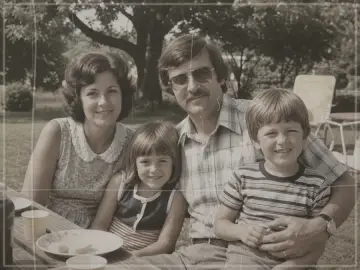
This illustrated example shows stronger contrast and clearer faces while keeping the composition and outdoor setting recognizable.


This illustrated example shows scratches, fold marks, and dust reduced without deliberately restyling the portrait.


This illustrated example shows one restrained color interpretation. The original scan remains the historical reference.
No. You can run one watermarked browser preview before signing in. A card is only involved if you later choose a paid option.
Sign in only if you want to save the result, continue restoring with starter credits, or use paid credits or Pro for a watermark-free export.
Do not pay for that result. Try a sharper, uncropped scan with less glare or compression, then compare again.
Keep exploring
Move from the focused tool to the guide, a safer review path, or the next step in the restoration workflow.