Damage is partial
Scratches, dust, fold lines, stains, and small torn edges are safer than a missing face or an absent half of the scene.
Use this page when the main problem is physical damage from paper, storage, water, folds, or dust. It focuses on repairing visible damage before style or color.
Open the repair toolIf an entire face or major object is missing, no automatic tool can truly know what was there. Use repair for partial damage, then use a human retoucher for high-stakes reconstruction.
Physical damage is a good automatic-repair candidate only when enough of the original subject remains visible to check the result.
Scratches, dust, fold lines, stains, and small torn edges are safer than a missing face or an absent half of the scene.
Zoom into damage crossing an eye, hand, patterned fabric, handwriting, or frame edge. The repaired line should not replace the object.
Save the untouched scan. For family records, legal material, or museum work, label the repaired copy as an interpretation.
This illustrated scratched-print example focuses on fold lines and surface damage. Missing facial areas remain a higher-risk job.

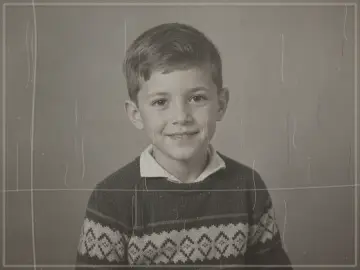
This illustrated example shows scratches, fold marks, and dust reduced without deliberately restyling the portrait.
It may create a plausible face, but that would not be verified recovery. Use reference photos and a human retoucher when identity matters.
Repair scratches, stains, and folds first. Enhance or upscale only after the surface damage is under control.
Check faces, hands, handwriting, uniforms, borders, and objects crossed by the original damage at full size.
Keep exploring
Move from the focused tool to the guide, a safer review path, or the next step in the restoration workflow.